
Nginx TLS tuning won’t fix a slow application, but it does cut handshake overhead and improve connection reuse, which shaves milliseconds off every HTTPS request. This guide covers the TLS, HTTP/2, and HTTP/3 settings I use to keep Nginx fast without giving up modern security. The goal is lower TTFB (Time To First Byte) and reduced latency.
In This Article
Are SSL certificates using SSL or TLS?
Online, we still use the term “SSL” (Secure Sockets Layer) to refer to the encryption protocol used for secure communication, even though they are actually using TLS. For example, SSL certificates are used to establish a secure connection between a client and a server over the internet. However, SSL itself is considered deprecated and insecure, and modern encryption protocols such as TLS are used instead.
Also, the term “SSL certificate” still lives on and is used informally to refer to digital certificates, even though the actual protocol being used is TLS. That said, it’s important to note that TLS should be used instead of SSL, as it is more secure and provides better protection against attacks.
To promote the use of secure encryption protocols, it’s recommended to start using terms like “TLS” and “TLS certificate” in our emails and communications. In fact, as I update this article, I’ll be removing much of the instances of the term SSL.
The importance of TLS 1.2 & TLS 1.3
Online security is a major concern for both individuals and businesses. Encryption plays a vital role in safeguarding online data, and one of the most popular encryption protocols is the Transport Layer Security (TLS) protocol. Let’s briefly look at the importance of TLS 1.2 and TLS 1.3.
Since 30th June 2018, the PCI Security Standards Council has required that support for SSL 3.0 and TLS 1.0 be disabled and, more recently, to also disable TLS 1.1. So that, as of updating this article, using TLS 1.2 and 1.3 is strongly recommended. In addition, Google Chrome began marking ‘HTTP’ websites as “not secure” back in 2018, and the web has since moved almost entirely to HTTPS. As of 2026, around 95% of web traffic loads over HTTPS and the web’s top 100 websites all use HTTPS by default.
With this in mind, let’s look at Nginx TLS tuning tips to improve the performance of Nginx + HTTPS for better TTFB and reduced latency.
How much can TLS tuning actually improve TTFB?
Before we get into the config, a reality check. TLS tuning helps, but for most sites it isn’t where the big TTFB numbers come from.
On a typical WordPress, PHP, or application backend, the time to first byte is dominated by what happens after the handshake: PHP execution, database queries, cache hits and misses, how far the visitor sits from your origin, and your CDN setup. Shaving milliseconds off the TLS handshake is real, and on a fast backend it’s noticeable, but it won’t rescue a site that spends 800ms building the page.
So treat the tips below as one layer. Get them right because they’re cheap and they compound, then spend the rest of your effort on caching, your database, and your CDN.
Enable HTTP/2 and HTTP/3 & QUIC on Nginx
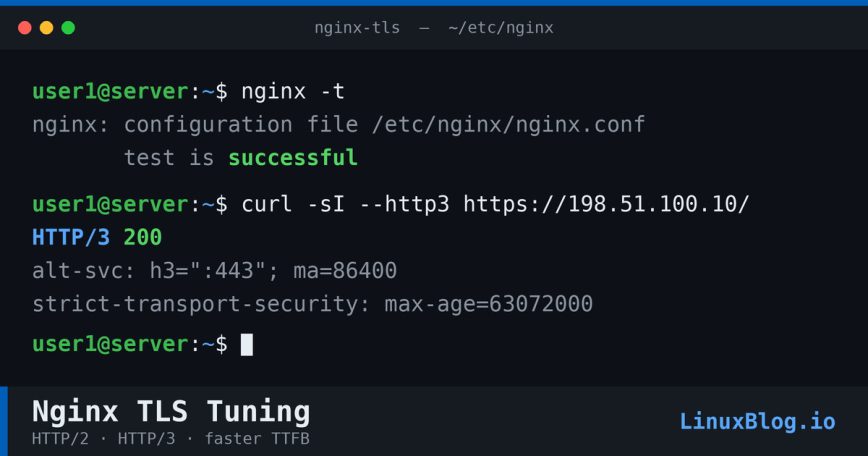
The first step in tuning Nginx for faster TTFB/latency with HTTPS is to ensure that at least HTTP/2 is enabled. HTTP/2 was first implemented in Nginx version 1.9.5 to replace spdy. (Remember: HTTP/2 requires HTTPS)
If you set this up years ago, your config probably looks like this:
listen 443 ssl http2;
That still works, but since Nginx 1.25.1 the http2 parameter on the listen directive is deprecated. Run nginx -t on a current build and you’ll see the warning. The fix is to move HTTP/2 onto its own directive:
listen 443 ssl;
http2 on;
The http2 directive enables the protocol per server block, which is cleaner than tying it to every listen line. If you run a fleet of servers, check that every box is on 1.25.1 or newer before you switch, since an older Nginx won’t recognize http2 on; and will fail to start.
Enable HTTP/3 with QUIC

When I first wrote the HTTP/3 part of this article, enabling it meant patching and compiling Nginx from source against a QUIC-capable TLS library. That era is over. Native QUIC and HTTP/3 support shipped in the Nginx mainline starting with 1.25.0 and has since matured into the stable branch, so on a recent distro or the official Nginx repo you no longer build it by hand.
Despite years of excitement around HTTP/3, real-world adoption has been slower than expected. By mid-2026, HTTP/2 serves just over half of all requests while HTTP/3 sits near 21% and has plateaued for several months (source). Part of that gap is structural: a browser only upgrades to HTTP/3 after it discovers support through an Alt-Svc header or DNS record, so plenty of first-visit page loads never negotiate QUIC at all. HTTP/3 is still worth enabling. It moves the transport to UDP and removes TCP head-of-line blocking, which helps most on lossy or high-latency mobile connections. Just don’t expect every visitor to arrive over it.
On Nginx 1.25.0 or newer with QUIC support built in, a server block looks like this:
server {
    listen 443 ssl;
    listen [::]:443 ssl;
    listen 443 quic reuseport;
    listen [::]:443 quic reuseport;

    http2 on;

    ssl_certificate     /path/to/your/certificate.pem;
    ssl_certificate_key /path/to/your/key.pem;

    # Advertise HTTP/3 to clients arriving over HTTP/1.1 or HTTP/2
    add_header Alt-Svc 'h3=":443"; ma=86400';

    # ... rest of your server config
}
One caveat on reuseport: specify it only once per IP and port combination. If you run multiple server blocks on the same address, put reuseport on the default block only and use listen 443 quic; on the rest, or Nginx will refuse to start.
The Alt-Svc header is the part people forget. Without it, browsers have no way to know your server speaks HTTP/3, so they stay on HTTP/2. Reload and test:
nginx -t
nginx -s reload
If your distro’s Nginx package was built without the QUIC module, check the official install guide for a build that includes it rather than compiling from source.
Check if HTTP/2 or HTTP/3 is enabled using Google Chrome
To confirm if HTTP/2 or HTTP/3 is enabled:
> open your website in Google Chrome
> right-click anywhere on the web page and select Inspect
> click the Network tab
> press F5 (on your keyboard) or refresh your web page manually
> the Protocol column should now show h2 or h3 for all assets loaded via your server
> If the Protocol column is missing, you can add it using right-click.
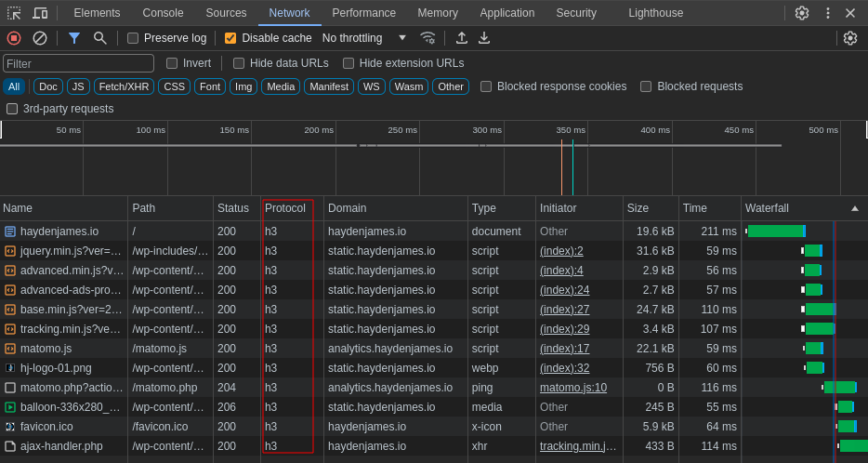
Google Chrome inspect network http/2 (h2), http/3 (h3) check.
Check if HTTP/2 or HTTP/3 is enabled using the command line
To test from your Linux/Mac command line with curl:
(Don’t also forget to curl test your CDN-hosted requests. Example: cdn.domain.com.
Compare KeyCDN, BunnyCDN and other CDN providers which support HTTP/2)
curl --http2 -I https://domain.com/
curl --http3 -I https://domain.com/
If the –http3 command does not work, you can also check here.
Enable SSL session cache
With HTTPS connections, instead of end-users connecting via one round trip (request sent, then the server responds), the connection needs an extra handshake. However, using HTTP/2 and enabling Nginx ssl_session_cache will ensure faster HTTPS performance for initial connections and faster-than-http page loads.
Using the option ssl_session_cache shared:SSL:[size], you can configure Nginx to share cache between all worker processes. One megabyte can store about 4000 sessions. You’ll also want to specify the time during (cache TTL) allowed for reuse:
ssl_session_cache shared:SSL:1m; # holds approx 4000 sessions
ssl_session_timeout 1h; # 1 hour during which sessions can be re-used.
Disable SSL session tickets
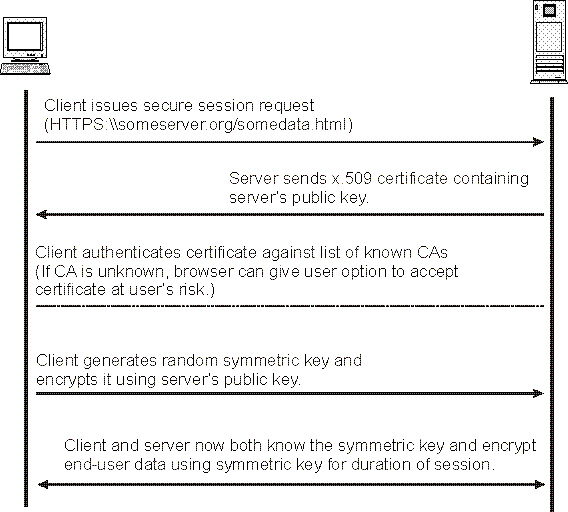
Because the proper rotation of session ticket encryption key is not yet implemented in Nginx, you should turn this off for now.
ssl_session_tickets off;
Update: Since Nginx 1.23.2, ticket key handling for stateless session resumption is much improved, so the old reason to disable it is gone. Unless you run a multi-server setup without synchronized ticket keys, keep this on:
ssl_session_tickets on;
If you run multiple load-balanced Nginx servers, remember that session ticket keys need to be shared and rotated consistently across the fleet, otherwise resumption breaks and you lose the benefit.
Disable old TLS versions (and decide on TLS 1.2)
As we’ve discussed in the opening, HTTPS and HTTP/2(3) are a move toward the latest, fast and most secure web technology, and the protocol floor has risen with it. TLS 1.0 and 1.1 are obsolete, blocked by every current browser, and disallowed under PCI DSS. They should be off everywhere.
That leaves the real decision: TLS 1.2 and 1.3, or 1.3 only.
For most public-facing sites, keep both enabled:
ssl_protocols TLSv1.2 TLSv1.3;
TLS 1.3 is the one that helps TTFB. It cuts the handshake to a single round trip and supports session resumption, so returning visitors connect faster. TLS 1.2 stays in the list as a fallback for the occasional older client, and on a normal site it costs you nothing to leave it on.
Go TLS 1.3 only when you control the clients, an internal API, an app backend, or a service where you know nothing old needs to connect:
ssl_protocols TLSv1.3;
Disabling TLS 1.2 on a public site is the kind of change that looks clean in a config file and then quietly drops a slice of real traffic. Unless you have a specific reason, leave it on. (TLS 1.3 needs Nginx 1.13 or newer.)
Enable OCSP Stapling
OCSP (Online Certificate Status Protocol) stapling lets Nginx attach a time-stamped, CA-signed proof of certificate validity to the TLS handshake, so the client doesn’t make its own round trip to the CA to check revocation. For years this was a solid TTFB win on cold connections, and the config still looks like this:
ssl_stapling on;
ssl_stapling_verify on;
ssl_trusted_certificate /path/to/full_chain.pem;
resolver 8.8.8.8 8.8.4.4 valid=300s;
resolver_timeout 5s;
Here’s what changed, and it matters if you use Let’s Encrypt. Let’s Encrypt ended OCSP support and shut off its responders on August 6, 2025. Certificates it issues now ship with no OCSP URL and a CRL URL instead. With no responder to query, ssl_stapling on; does nothing on a Let’s Encrypt certificate and Nginx logs an "ssl_stapling" ignored, no OCSP responder URL warning.
So the honest 2026 take: OCSP stapling is no longer one of the main TTFB levers. If your CA still publishes an OCSP URL, stapling remains a small, harmless win and you can keep it on. If you’re on Let’s Encrypt, the directives above are now inert, and you can drop them to keep your config clean and your logs quiet. The industry is moving revocation toward CRLs and short-lived certificates, and this is part of that shift.
Note: ssl_trusted_certificate specifies the trusted CA certificate chain file, in PEM format, used to verify OCSP responses where they still apply.
Reduce SSL buffer size
The Nginx ssl_buffer_size config option sets the size of the buffer used for sending data via HTTPS. By default, the buffer is set to 16k, a one-size-fits-all approach geared toward big responses. However, to minimize TTFB (Time To First Byte), it is often better to use a smaller value, for example:
(I was able to shave about 30 – 50ms off TTFB. Your mileage may vary.)
ssl_buffer_size 4k;
Full Nginx SSL config for improved TTFB
Pasted below my full Nginx TLS config for this blog, updated for 2026. The ssl_ciphers string only affects TLS 1.2 clients; TLS 1.3 negotiates its own suites.
http2 on;
ssl_protocols TLSv1.2 TLSv1.3;
ssl_prefer_server_ciphers off;
ssl_ciphers 'ECDHE-ECDSA-AES128-GCM-SHA256:ECDHE-RSA-AES128-GCM-SHA256:ECDHE-ECDSA-AES256-GCM-SHA384:ECDHE-RSA-AES256-GCM-SHA384:ECDHE-ECDSA-CHACHA20-POLY1305:ECDHE-RSA-CHACHA20-POLY1305';
ssl_session_cache shared:SSL:10m;
ssl_session_timeout 1d;
ssl_session_tickets on;
ssl_buffer_size 4k;
A few notes on what changed from the older version of this block. With TLS 1.3 the cipher suites are fixed by the protocol, so a long custom ssl_ciphers string and a manual ssl_ecdh_curve line buy you almost nothing. The ciphers above only apply to TLS 1.2 connections, and ssl_prefer_server_ciphers is now off because modern clients pick sensibly on their own. Rather than hand-tuning this forever, generate a current config from the Mozilla SSL Configuration Generator and paste in the parts you need.
Test config, then reload Nginx after changes:
nginx -t
nginx -s reload
Enable HTTP Strict Transport Security (HSTS)
Another Nginx HTTPS tip is to enable HSTS preload. HTTP Strict Transport Security (HSTS) is a header that allows a web server to declare a policy that browsers will only connect to using secure HTTPS connections and ensures end users do not “click-through” critical security warnings. (locks clients to HTTPS) This policy enforcement protects secure websites from downgrade attacks, SSL stripping, and cookie hijacking. Also, see https://hstspreload.org/#submission-requirements.
add_header Strict-Transport-Security "max-age=63072000; includeSubdomains; preload";
Other headers I set in my Nginx config for this blog:
add_header X-Frame-Options sameorigin; # read here
add_header X-Content-Type-Options nosniff; # read here
If you’ve carried an X-Xss-Protection "1; mode=block" line in your config for years, drop it. The browser XSS auditor it controlled has been removed from every major browser, and in some cases the header can introduce vulnerabilities rather than prevent them. A Content-Security-Policy is the modern replacement.
Also, see Analyze Your Website’s TTFB (Time to First Byte).
HTTP/2 reference and useful reading
HTTP/3 & QUIC reference and useful reading
Published: June 30th, 2018 | Last updated: June 10th, 2026


