
What do you do when you question whether your internet connection is working, or not? I built Pinging.net to be a fast and convenient way to monitor your internet connection.
How does pinging.net work?
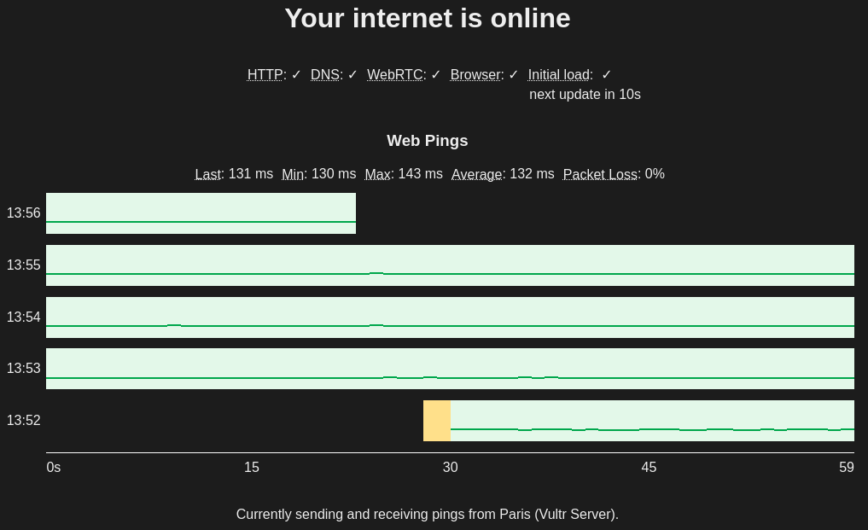
Visiting Pinging will automatically run a few tests. Firstly, caching for the site is disabled, so when the page loads you have a good indication that your internet is working. The site then does a DNS and HTTP POST test, these are repeated every 30 seconds. It also starts sending “Web Pings”.
What are web pings?
A ping is sending a single packet and waiting for a single response. This is normally done using ICMP ping packets but since a website can’t send actual ICMP ping packets, I had to make do with the best I can, UDP packets.
The only way I know of to send/receive UDP as a website is through WebRTC so that is what the site does. By using UDP, we avoid TCP retries so we can see and monitor packet loss and get more accurate round trip latency metrics.
So Pinging sends a web ping every second and graphs the latency of the ping in a custom-built chart, and dropped packets show up as red squares. The graph view makes certain kinds of periodic issues a lot more apparent.
Pinging is DNS load balanced using Cloudflare to route people to the closest server. I currently have 3 virtual servers running and will add more as traffic demands. Cloudflare will also remove origin servers that have failed. I currently have pinging running in two clouds (Google Compute and Vultr) so it should be pretty high availability.
Pinging.net – a convenient and fast alternative
So, back to the original question, what do you do when you wonder if your internet connection is working? I used to mostly use example(.com) since it was fast and always up. I would then pull up a terminal and do a combination of pings to various IP addresses or hostnames. Pinging is a convenient and fast alternative. But seriously, let me know what you do when you are testing your internet? I would love to hear any feedback too. Thanks!
The frontend is written in TypeScript and the backend is written in Rust. It is all open source and available on GitHub at benhansenslc/pinging.


